
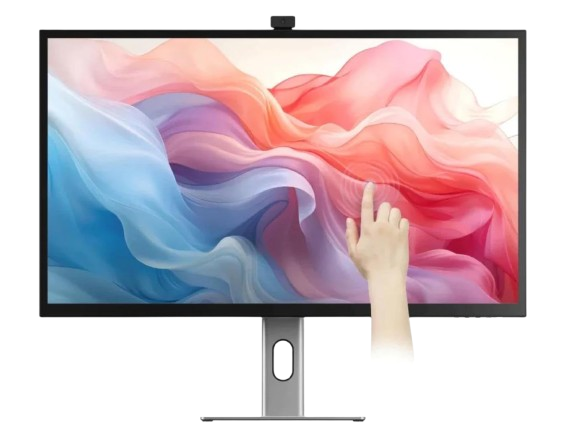
If you’ve been browsing for a monitor that delivers nearly premium looks and strong performance without the ultra-high cost, the Alogic Clarity 27-inch 4K might be worth your attention. This monitor tries to hit a sweet spot: excellent design, useful features, and good value. Read our Alogic Clarity 27-inch 4K Monitor review. Discover its display quality, design, and value as a budget-friendly alternative to premium monitors.
Performance & Colors: Alogic Clarity 27-inch 4K Monitor
Here are some of the features that people are talking about:
27-inch 4K UHD resolution, IPS panel with strong color accuracy.
Adjustable aluminium stand (tilt, height, swivel, pivot), even VESA mount compatibility.
Solid connectivity: USB-C (with power passthrough), DisplayPort, HDMI ports, built-in USB hub.
Glossy glass front, generous brightness (HDR600 rating in some variants), wide viewing angles.

What Users & Experts Like
In this Alogic Clarity 27-inch 4K Monitor review, we explore whether this stylish 4K display can truly compete with premium brands at a lower price. Here’s what people consistently mention in reviews and hands-on tests:
Design & build: Many say the aesthetics are excellent — metal finishes, tidy cable layout, premium feel. It resembles more expensive displays (e.g. Apple Studio Display) but for much less.
Color accuracy: For photo editing, video work, or design work, the colors are reliable. The panel covers large color spaces, offers good calibration options.
Convenience & ports: The hub at the back, the ability to charge through USB-C (for laptops), and multiple input options get positive mention. Switching between devices (PC / Mac) is reasonably smooth.
What People Notice as Trade-Offs
Since no product is flawless, here are some of the things that reviewers or users say could be better:
Refresh Rate Limited: The monitor is 60 Hz, which is fine for most creative/professional work, but not ideal if you want high-frame gaming or very fluid motion.
OSD / Button Layout: Some find the menu buttons (on the bottom edge) less intuitive, harder to find by touch, and not always very responsive.
Glossy Glass: While it enhances color pop and premium look, it can reflect ambient light, so setup matters. If you have strong overhead lights or window glare, you may notice reflections.
Speakers & Webcam (if included): Depending on which variant, built-in speaker quality is okay but not mind-blowing. Also, while there are versions with webcams / touch, the extra features sometimes come with compromises (lower power passthrough, higher cost, more complex setup).

Who This Monitor Is Best For
Here’s a quick profile of who will get the most out of the Alogic Clarity 27-inch 4K:
| Perfect If You… | Maybe Go For Something Else If… |
|---|---|
| • You’re a creative professional (photo, video, design) who needs good color accuracy but not necessarily ultra-high refresh rate. • You want a premium look + strong versatility in ports and stand adjustability. • You use both a laptop and/or desktop and want one display to connect easily with both. | • You do a lot of fast action gaming and care about refresh rates above 60Hz. • Glare is a dealbreaker and your workspace has lots of light exposure. • You need top-tier built-in audio or extremely high brightness for HDR work. |
Verdict: Is It Worth It?
Overall, the Alogic Clarity 27-inch 4K is a strong value proposition. It gives you many design touches, accurate color, and good features that make it feel much more expensive than it is. For creatives and professionals who don’t need bleeding-edge gaming specs, this is one of the best mid-premium choices out there.
If I were you, I’d recommend this monitor as a “best bang for your buck alternative” when you want something close to a premium display but don’t want to stretch to something like the Apple Studio Display.